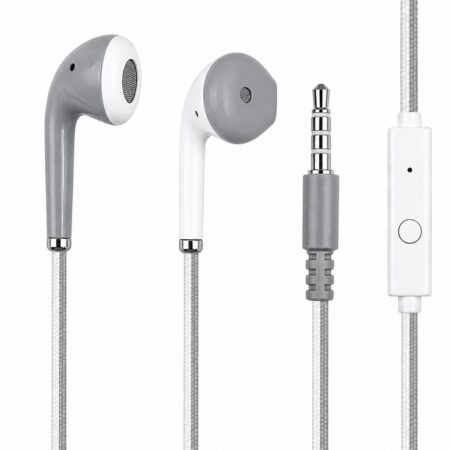
- Three ear-tip sizes small, medium and large for personal fit.
Who Are Audeara Buds Best For?
- Conversation-focused listeners Speech Mode prioritises voices in front of you in many everyday settings.
- Music and podcast listeners apply individualised tuning to entertainment streamed from a compatible phone or tablet.
- People who value awareness Aware Mode passes environmental sound through.
- Commuters Focus Mode adds ANC for distracting environments; stay aware when safety requires it.
- Auracast users receive broadcasts from compatible sources such as supported public audio systems.
Not a replacement for prescribed hearing aids people with diagnosed or suspected hearing loss should seek a qualified hearing-care assessment rather than using a consumer PSAP as medical treatment.
Product Overview
Personalised Wireless Listening
Audeara Buds combine in-ear streaming earbuds with ambient listening features. The Audeara Tune app guides a hearing check and creates separate left/right sound profiles. Once uploaded to the earbuds, the profile can personalise music, calls and compatible ambient listening modes.
At a Glance
- Listening modes: Focus (ANC), Aware and Speech
- Wireless: Bluetooth plus Auracast reception and compatible NFC phone pairing
- App: Audeara Tune for iOS and Android
- Charging: USB-C smart case; charging pad option described by Audeara support
- Water resistance: IPX4
- Up to 8 hours in non-streaming listening modes; conditions vary
Personalised Hearing Profile
Hear Sound Tuned to Each Ear
The Audeara Tune app provides a guided hearing check and generates a separate listening profile for each ear. Upload the results to the earbuds to personalise compatible streaming and ambient sounds. Since ears can respond differently to sound, separate settings offer a more nuanced approach than a single generic equaliser preset.
Audeara describes this as personalised consumer listening, not a medical hearing test, diagnosis or treatment. If you have persistent hearing difficulty, consult an audiologist or other qualified professional. Read Audeara’s device classification.
Focus, Aware & Speech Modes
Choose the Listening Mode for the Moment
- Focus Mode uses active noise cancellation (ANC) to reduce environmental distractions during listening.
- Aware Mode brings surrounding sounds into the earbuds so you can stay connected to activity nearby.
- Speech Mode enhances speech from the direction in front while reducing some distracting background sound.
Switch modes with a long press of a bud sensor or the multifunction button on the smart case. Ambient noise reduction and understanding of speech will vary with fit, environment and individual hearing. Official listening-mode instructions.
Bluetooth, Auracast & Everyday Uses
Listen to Your Devices or a Supported Broadcast
Use Bluetooth to connect to a compatible phone, tablet or laptop for music, video, calls and entertainment. With Auracast support, the earbuds can also receive compatible broadcast audio, including broadcasts made available by a supported transmitter or venue.
Important a standard TV with Bluetooth does not automatically provide an Auracast broadcast. For TV audio, check the source device and whether an appropriate streamer is included or must be purchased separately. The Audeara Buds themselves are not a TV transmitter.
Accessible Controls & Comfortable Fit
Controls Beyond the Earbuds
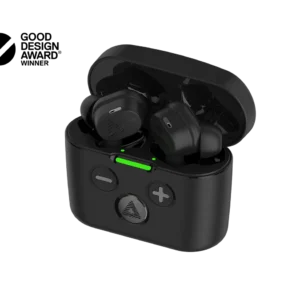
The smart charging case is more than storage: it has physical volume buttons and a multifunction button for controlling modes or audio, alongside indicator LEDs for both earbuds and the case. Touch sensors on the earbuds provide an alternative when you do not want to reach for the case.
Use the included S/M/L ear tips to find a comfortable seal, especially for listening quality and ANC performance. Left and right earbuds are visibly marked. NFC tap-to-pair is available with compatible phones; ordinary Bluetooth pairing is an alternative.
Battery Life & Charging
How Long Do Audeara Buds Last?
Audeara’s support documentation quotes estimated battery endurance depending on listening mode: up to 8 hours in Aware or Speech listening-only mode, about 6 hours 30 minutes in those modes while streaming media, and about 7 hours 30 minutes in Focus Mode while streaming. The charging case provides additional charges; Audeara’s detailed support page mentions approximately 2.5 additional full charges, while its overview markets two additional charges.
The buds are charged in the smart case; the case supports USB-C charging and, with the appropriate charging pad, pad-based charging. Approximate full earbud charging time is 1 hour 25 minutes. Manufacturer battery guide.
Pros & Cons
Advantages
- Personalised tuning for each ear
- Three genuinely different listening modes
- Bluetooth and Auracast reception
- Physical case-based controls complement touch sensors
- IPX4 splash resistance and multiple ear tips
Limitations
- Not a regulated hearing aid or substitute for clinical hearing care
- ANC does not eliminate all ambient noise
- Auracast requires compatible broadcasts and appropriate setup
- Battery life falls when some modes and streaming run together
- In-ear seal and the app setup may take adjustment
Why Buy Audeara Buds from HearFIT?
Choose the Right Listening Setup
HearFIT brings together hearables and hearing amplification products for different priorities. The Audeara Buds are especially relevant when you want in-ear everyday listening, app-based sound personalisation and the option to hear speech or ambient sounds without changing devices.
Before purchasing, verify earbud fit, desired phone compatibility and any TV or Auracast equipment you plan to use. Ask HearFIT about ordering, support and which accessories are available with your exact package. Avoid assuming that external TV transmitters are included.
Audeara Buds | Personalised Listening Earbuds
Personalised wireless earbuds with Audeara Tune, Focus ANC, Speech and Aware modes, Auracast and accessible charging-case controls.
ADD TO CART — AUDEARA BUDS
EXPLORE HEARABLES
Audeara Buds | Hear More of What Matters
Take your music, conversations and everyday listening into your own hands with a profile tailored separately to each ear.
Technical Specifications
Audeara Buds Specifications
Manufacturer sources: Audeara product page and battery documentation. Battery life varies by use.
What’s in the Box
Audeara Buds Package
- Left and right Audeara Buds
- Smart Charging Case with physical controls
- Ear tips: small, medium and large
- USB-C power cable
- Quick Start Guide
A separate TV streamer or charging pad is not listed in Audeara’s standard Buds box contents. Confirm the precise HearFIT package before ordering.
How to Set Up and Use Audeara Buds
Getting Started
- Fit select an ear tip size that feels comfortable and secure.
- Pair leave earbuds in the open case; hold the multifunction button for about three seconds until the LEDs cycle blue, then select Audeara Buds in phone Bluetooth settings.
- Personalise open Audeara Tune on iOS or Android, complete the guided check and upload the separate hearing profiles.
- Select a mode change between Focus, Aware and Speech using the case or earbud sensor.
- Charge return earbuds to the case and connect USB-C power as needed.
For problems with pairing, fit or controls, use Audeara’s official Getting Started guide.
HearFIT
Audeara Buds Specifications & What’s Included
Audeara Buds Frequently Asked Questions
Are Audeara Buds hearing aids?
No. Audeara describes Buds as personal sound amplification products (PSAPs), not medical hearing aids. They provide personalised consumer listening and do not replace assessment or treatment of hearing loss.
What is different about Audeara Buds?
They offer separate left/right hearing profiles from the Audeara Tune app, three modes—Focus, Aware and Speech—and physical controls on their smart charging case.
Do Audeara Buds have active noise cancellation?
Yes. Focus Mode uses active noise cancellation to reduce some environmental noise. ANC effectiveness depends on fit and surroundings.
What is Speech Mode on Audeara Buds?
Speech Mode highlights speech from in front of the listener while reducing some background noise, making it suitable for certain conversations. Results vary.
What is Aware Mode?
Aware Mode helps you hear surrounding activity through the earbuds, including while listening to compatible streamed media.
Do Audeara Buds connect with Bluetooth and Auracast?
Yes. The buds support Bluetooth connectivity with compatible personal devices and reception of supported Auracast broadcasts. Ordinary Bluetooth does not automatically mean an audio source broadcasts Auracast.
Can I use Audeara Buds with my TV?
Possibly, with a compatible TV audio source, Bluetooth streamer or Auracast broadcaster. A TV transmitter is not included with standard Audeara Buds. Check your source setup before ordering.
How long do Audeara Buds last per charge?
Audeara estimates up to 8 hours in listening-only modes; around 6.5 hours in Aware/Speech with streaming, or 7.5 hours in Focus with streaming. Actual runtime depends on settings and use.
Are Audeara Buds waterproof?
No. The earbuds have an IPX4 splash-resistance rating, not a waterproof rating. Do not swim or shower with them; keep the case dry.
How do I customise the sound?
Install Audeara Tune on a compatible Apple or Android device, complete the guided listening check, and upload the resulting profile to each earbud.
Can I change volume without using my phone?
Yes. The smart case has physical plus/minus volume buttons, and its multifunction button can change listening modes. Earbud sensors are also available.
What comes with Audeara Buds?
The standard package includes the earbuds, smart charging case, three sizes of ear tips, USB-C cable and quick-start guide. Other equipment is sold separately unless a bundle explicitly includes it.
HearFIT World
Audeara Buds vs A-02 Headphones vs Buds TV Bundle
Choosing between Audeara Buds, larger A-02 over-ear headphones and the Audeara Buds TV Bundle? The biggest differences are wearing style, sound-control modes and whether a compatible TV streamer comes in the package. Compare based on your intended listening setup.
Sources: Audeara Buds, Audeara A-02 TV Bundle and Audeara TV Listening overview. This is a feature comparison, not an independent listening test.
Final Thoughts
Personal Sound for Music, Speech and Daily Life
The Audeara Buds make the strongest case for listeners who want one compact pair of earbuds that can adapt between entertainment, everyday awareness and speech-oriented listening. Their left/right hearing profiles, three sound modes and accessible case controls stand out from conventional one-profile earbuds.
They are best approached as consumer listening aids, not hearing aids prescribed for diagnosed hearing loss. Their usefulness for particular conversations or environments depends on fit, settings and personal needs.
Bottom line choose Audeara Buds for personalised wireless earbuds with Focus ANC, Speech/Aware modes and Auracast reception. If your main priority is TV, compare the Buds TV Bundle and confirm the required transmitter before purchase. For longer over-ear listening, consider Audeara A-02 TV products.
Explore HearFIT Hearables or contact HearFIT about compatibility and availability. See official specifications for product details.