About this product
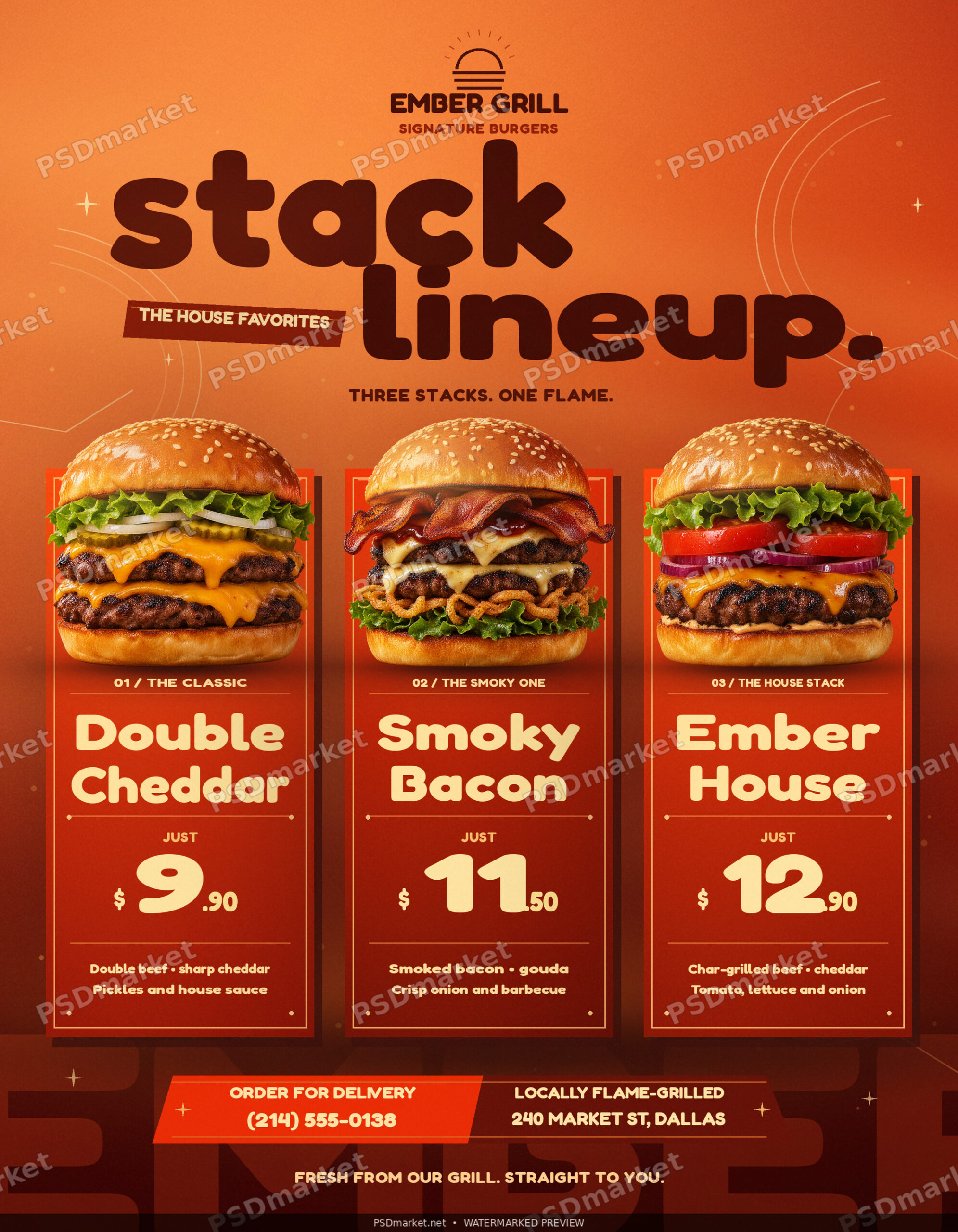
An editable, print-resolution burger menu flyer with three glowing copper offer cards, richly lit food photography, and a matched layout for prices and ordering details.
Show customers three good reasons to order. Ember Stack Lineup is a burger menu flyer template for diners, grill houses, food trucks, and delivery kitchens that want to promote their signature dishes side by side. It pairs bold, rounded display type with a flame-warm palette, clear prices, and close-up food images. The three offer panels make it easy to compare burgers without making the design feel like a long menu.
Give different burgers their own identity
The sample lineup shows a Double Cheddar with molten cheese and pickles, a Smoky Bacon stack with curled bacon and gouda, and an Ember House burger with tomato, onion, and lettuce. Each image sits in its own editable group, so you can keep the sample artwork, replace it with your own product photography, or reuse the layout for other sandwiches. The panel shadows and warm studio accents are separated from the food, letting you match the lighting when you make a swap.
All three offers follow the same reading order: a short category cue, a two-line burger name, a prominent price, and two simple ingredient details. The template reserves a separate footer for delivery information and the restaurant address. That ordering strip keeps contact details findable and leaves the menu cards to sell the food.
Show allShow less
Customize the flyer in Photoshop or Photopea
Install the included Ember Rounded display font, then open the layered PSD. Change names, prices, contact details, and supporting copy with the Type tool. The dollar sign, main price digits, and cents are built as separate type layers, so you can change a price without disturbing the neighboring card. Edit all three parts as needed, and adjust the type width if a replacement name runs longer.
Use the named card groups to locate a burger image, its price and description, panel fill, and supporting light or shadow layers. Switch an offer from a classic burger to a veggie special, introduce a limited-time stack, or adapt all three panels for different meal bundles. The consistent grid makes seasonal updates easier, even if each product needs different artwork.
What’s included
- 2625 × 3375 px RGB layered PSD at 300 ppi
- Three independent offer groups, each with isolated product artwork
- Editable text layers for headlines, prices, ingredient lines and contact information
- Separate backgrounds, card panels, highlights, and contact shadows
- Clean full-resolution JPG sample
- Ember Rounded Bold font, open font license, and editing notes
This digital download does not include a printed flyer. The menu prices and business information in the artwork are examples. Replace them with your own details, check the ingredients and allergen information, and ask your printer about bleed and color requirements before sending a finished print file.
In Psdmarket's own words. See it at Psdmarket