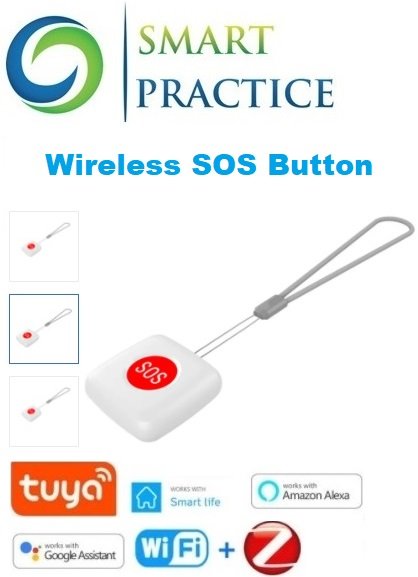
Product model MYQ-ZSOS
Product Category SOS Button
Protocol Zigbee
Product Color: White
Market Specifications
Chinese Version, Chinese Version(Neutral Packaging),IN Standard, Chinese Standard, Japanese Version, Japanese Standard, Regular Version, Brazil Standard, test, Test box, EU Standard, US Standard, FR Standard, AU Standard, British Version, UK Standard, Metering Version, General Version
Battery Type Button Battery
Function Description
ZigBee SOS Panic Button
1.Sends push notification when press SOS
2.Powered by Battery: CR2450
3.Standby current: 10.7uA
4.Support smart scene setting to turn on/off other devices(switch, bulbs, alarm, curtains)
5.Wireless Type: ZigBee 3.0,Frequency: 2.4~2.485GHz IEEE 802.15.4
Sales Area Mainland, China, North America, South America, Europe, Southeast Asia, Japan and South Korea, Middle East, Africa, Australia, Other, Japan, South Korea, Asia, Hong Kong, China, Macao, China, Taiwan, China
Certification CE
Material /
Package Size 80*80*20 mm
Product Size 70*70*15 mm
Carton Size 500*500*105 mm
Net Weight 30 g
Warranty 12 month
Packing Quantity 200
Packing List N/A
Bulk Delivery 8 day
Support For Custom Types Logo customization, Packaging customization
Power Supply Type Battery CR2032
Operation environment Indoor
Product on Sale Time Apr.10, 2020