About this product
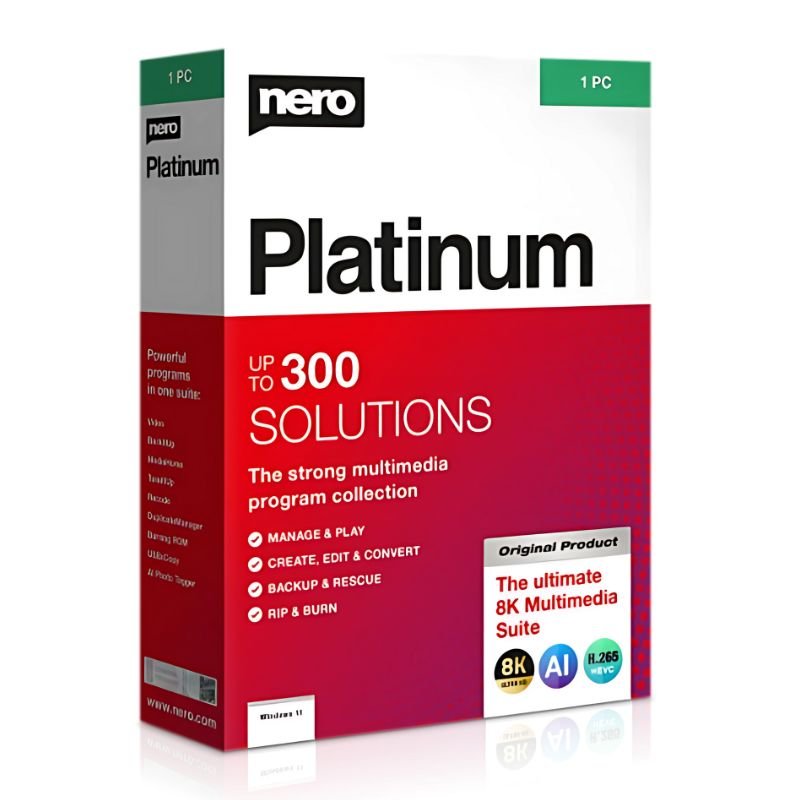
- Order number NeroPS
- Manufacturer Nero
- State New
- Devices 1 PC
- Duration 1 year
- Language All languages
- Country zone Worldwide
- Shipping method E-mail
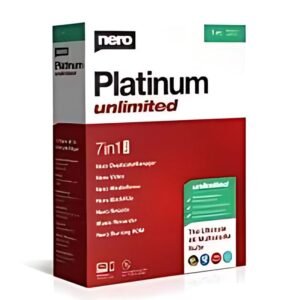
Master Your Media with Nero Platinum Suite 2025: The Ultimate All-in-One Solution!
Nero Platinum Suite 2025 is your all-in-one solution for mastering multimedia like a pro. Featuring seven robust tools, this suite empowers you to create, organize, and protect your digital content with unmatched efficiency. Whether you’re editing videos, managing photos, or backing up crucial data, Nero Platinum Suite 2025 transforms complex tasks into effortless achievements.
Key Features:
- Effortless Photo Organization with AI Nero Platinum Suite 2025’s AI-based scene recognition makes photo management a breeze. Quickly tag, rate, and search your photos, while duplicate images are automatically detected and removed. Enjoy organized albums and streamlined photo editing, all locally on your PC.
- Professional-Grade Video Creation Create cinematic masterpieces with Nero Video. Utilize hundreds of high-quality templates, apply professional effects like picture-in-picture and slow motion, and export in stunning 8K. Whether it’s a holiday highlight or a home movie, make it memorable with effortless editing and high-quality output.
- Streamline Your Music Experience With Audials Music Recorder, effortlessly capture songs from any streaming service in pristine quality. Edit your tracks, manage metadata, and import your CD collection with ease. Enjoy your favorite music organized and ready for playback whenever you want
Show allShow less
- Secure and Convenient Data Backup Nero BackItUp offers secure, flexible backup options to external drives, optical media, and cloud services. Create automated backups, incremental snapshots, and ensure data protection with 256-bit encryption. Keep your valuable data safe and accessible with minimal effort.
- Rapid Media Conversion and Ripping Nero Recode swiftly converts videos and music into any format you need. Rip discs directly to your mobile device and create custom conversion jobs for efficient media management. With Gracenote® integration, sort and enjoy your music with ease.
- Top-Tier Burning and Copying Nero Burning ROM delivers superior data, video, and audio burning. With SecurDisc 4.0 technology, ensure your files are secure with encryption and password protection. Burn high-quality audio CDs and create lasting copies with the utmost reliability.
- Optimized PC Performance Boost your PC’s speed with Nero’s optimization tools. Update drivers, enhance Internet speed, and manage your PC’s performance effectively. Resolve issues and improve efficiency to keep your system running smoothly.
- Comprehensive Multimedia Toolkit Nero Platinum Suite 2024 also includes tools for data recovery, personal data encryption, and media formatting. Be prepared for any situation with a versatile suite that handles a wide range of multimedia tasks.
Minimum system requirements for Nero Platinum Suite
- Windows® 7 SP1 Home Premium, Professional or Ultimate (32/64 bit), Windows® 8 (32/64 bit), Windows® 8.1 with April 2014 Update (32/64 bit), Windows® 10 (32/64 bit), Windows® 11 (32/64 bit)
- 2 GHz AMD or Intel® processor.
- 1 GB RAM
- For SD video editing and creation: 2 GHz AMD or Intel® processor, 1 GB RAM
- For HD video editing and creation: 2 GHz AMD or Intel® processor, 1 GB RAM
- 5 GB of free hard disk space for standard installation of all components (including templates, content, and temporary disk space)
- Microsoft® DirectX® 9.0 capable graphics card with 3D acceleration, 16-bit color depth, and at least 128 MB of video memory required (32-bit color depth, True Color, 256 MB of reserved video RAM, and Shader Model 3.0 support recommended).
- DVD drive for installation and playback.
- Drive for recordable or rewritable CDs, DVDs, or Blu-ray Discs for
- Burning and creating videos
- DirectX® 9.0c Revision 30 (August 2006)
- Windows Media® Player 9.
- Internet Explorer 11 or later
- Required third-party components, such as Microsoft Windows® Installer 4.5, Microsoft.NET® 4, Microsoft® DirectX®, or Adobe Flash, are shipped with the product or downloaded automatically if not included in the package.
- An Internet connection is required for some services.
- An Internet connection may be required to verify the serial number when using certain features
- Internet connection may be required. The cost of the Internet connection is borne by the user.
- Nero Streaming Player app and the WiFi + Transfer app: Android 4.4 and higher, iOS 9.0 and higher
- Streaming features may require an online update.
- Nero Streaming Player and Nero MediaHome WiFi Sync apps: Android 4.0 and higher, iOS 8.0 and higher
- Nero Video Manual App: Android 4.0 and higher, iOS 6.0 and higher
- Nero MediaHome Manual App: Android 4.0 and higher, iOS 6.0 and higher
- Nero MediaHome Receiver App: Android 4.0 and higher, iOS 6.0 and higher
- Streaming to Nero Streaming Player and Nero MediaHome Receiver requires Windows® 7 SP1 Home Premium, Professional, or Ultimate (32/64 bit), Windows® 8 (32/64 bit), Windows® 8.1 (32/64 bit), or Windows® 10 (32/64 bit)
- Nero KnowHow App: Windows® 10 or higher, Android 4.0 or higher, iOS 8.0 or higher
- Streaming in highest resolution requires Intel Haswell (i7-4770 or higher). It is recommended to leave the streaming setting in Auto mode. If streaming in highest resolution causes system performance issues, simply use a lower quality setting.
Notice:
- On 64-bit operating systems, applications run in 32-bit emulation mode.
- For the product to function properly, the devices must be installed correctly and recognized by the operating system.
- It is highly recommended to install the latest WHQL certified device drivers.
Special requirements for video editing and creation
- OHCI-compatible FireWire® controller (IEEE® 1394) for DV or HDV™ recording
- TV tuner or video capture card for analog and digital video recording
- Up to 50 GB of free hard disk space for disk images and temporary files.
- To support NVIDIA® CUDA™, AMD App Acceleration, or Intel® Quick Sync video technologies, an appropriate graphics card must be installed and at least 256 MB of video memory must be available.
- Appropriate hardware/software setup is required to play copy-protected video content.
Specific minimum requirements for HD video editing
- Intel® Core™ i7-6700 (4 GHz) or newer, 8GB RAM minimum
- 64-bit Windows® operating systems recommended
- Optional download and installation of VC++ 2015 redistributable x.64 for enhanced software decoding: https://www.microsoft.com/enus/download/details.aspx?id=53587
- Hardware-accelerated decoding of 8-bit HEVC source files with Intel HD 515 or newer and Nvidia GTX 960Ti graphics cards
- Hardware-accelerated decoding of 10-bit HEVC source files with Intel HD 620 or newer graphics cards and Nvidia GTX 1060 or newer graphics cards
Specific minimum requirements for Ultra HD (4K) playback, editing, and encoding
- Windows® 7 SP1 Home Premium, Professional or Ultimate (64 bit), Windows® 8 (64 bit), Windows® 8.1 (64 bit), Windows® 10 (64 bit)
- Intel® Core™ i7-2600K (3.4 GHz) or higher, AMD FX 8320 (3.5 GHz) or higher, 4 GB RAM
Specific minimum requirements for playback, transcoding and video editing of H.265 / HEVC (High Efficiency Video Coding) files
- Intel® or AMD dual-core processor with at least 2 GHz
Special/minimum requirements for OneDrive On-Demand in Nero MediaHome
- OneDrive On-Demand requires the Windows 10 Creators Update (version 16299.15 or higher) and OneDrive version 17.3.7064.1005 or higher
Specific minimum requirements for LightScribe and Labelflash™
- LightScribe compatible recorder and appropriate media
- LightScribe host software must be installed
- Labelflash™-compatible burner and corresponding media
Supported burning media
- CD-R
- CD-RW
- DVD±R
- DVD±RW
- DVD-RAM
- DVD±R DL
- BD-R
- BD-RE
- BD-R DL
- BD-RE DL
- BD-R TL (BDXL)
- BD-RE TL (BDXL)
- BD-R QL (BDXL)
- BD-RE QL (BDXL)
Supported disc formats
- Data CD (ISO, UDF, ISO/UDF)
- Data DVD (ISO, UDF, ISO/UDF)
- Blu-ray data disc (ISO, UDF)
- SecurDisc CD/DVD/Blu-ray disc
- Nero DiscSpan (UDF)
- Audio CD
- Mixed-mode CD
- CD EXTRA
- Nero Image (NRG)
- CUE image – import only
- ISO image
- Video CD
- Super Video CD
- DVD-Video
- DVD+VR – import only
- DVD-VFR – import only
- DVD-VR – import only
- AVCHD™ video
- BDMV video
- BDAV – import only
Supported audio formats and codecs
- Advanced Audio Coding (AAC) elementary stream – no copying
- MPEG High-Definition AAC (HD-AAC)
- Moving Picture Experts Group Audio Layer 3 (MP3/mp3PRO/mp3HD)
- MPEG-4 audio (MP4, M4A)
- MPEG Audio (MP2, MP2A, MPA, MPA2, M2A)
- Dolby® Digital (AC3)
- Audio Interchange File Format (AIFF, AIF)
- Compact Disc Digital Audio (CDA) – no encoding
- Ogg Vorbis (OGG, OGM, OGA)
- PCM WAV file, ADPCM wave file (WAV, WAVE)
- Windows Media™ Audio (WMA)
- Free Lossless Audio Codec (FLAC)
- Monkey’s Audio (APE)
- Matroska Audio (MKA)
Supported video formats and codecs
- Advanced Streaming Format (ASF)^
- HEVC/H.265 (MP4, MKV, TS) – Playback/Import only
- Audio Video Interleave (AVI, NVAVI)
- Digital Video (DV, DVSD)
- QuickTime® Movie (MOV)
- DVD Video Object (VOB)
- MPEG Video (MPG, MPEG, MPE, M1V, M2P, M2V, MOD, MP2V)
- MPEG-2 Transport Stream files (M2TS, M2T, MTS, TS, TOD, TRP)
- MPEG-4 video (MP4, DIVX)
- MPEG-4 AVC/H264
- Windows Media™ Video (WMV)
- Flash Video (FLV)
- Matroska Video (MKV)
- Video CD Movie (DAT)
- AVC Blu-ray Disc Video Format (BSF)
- Third Generation Partnership Project Movie (3GP)
- DVD Movie Info (IFO)
- Motion JPEG Video (MJPEG)
- MicroMV Video (MMV)
Supported image formats
- Bitmap (BMP)
- Device Independent Bitmaps (DIB)
- Graphics Interchange Format (GIF)
- Icon Image File (ICO)
- JPEG File Interchange Format (JFIF)
- Joint Photographic Expert Group (JPEG, JPG, JPE)
- Picture Exchange (PCX)
- Portable Network Graphics (PNG)
- Portable Pixel Map (PPM)
- Targa Image File (TGA)
- Tagged Image File Format (TIFF, TIF)
- Windows Metafile Format (WMF)
- Portable Bitmap (PBM)
Supported formats for playlists
- Moving Picture Experts Group Audio Layer 3 Uniform Resource Locator/MP3 URL (M3U)
- Moving Picture Experts Group Audio Layer 3 Uniform Resource Locator/MP3 URL + UTF-8 (M3U8)
- Playlists File Format (PLS)
- Windows Media® Player Playlists (WPL)
- iTunes Playlists
Nero Recode – supported devices and formats
- DVD-Video (PAL – 25 fps)
- DVD-Video (NTSC – 29.97 fps)
- Blu-Ray Disc/AVCHD (PAL – 25 fps)
In Softdigitalkey's own words. See it at Softdigitalkey