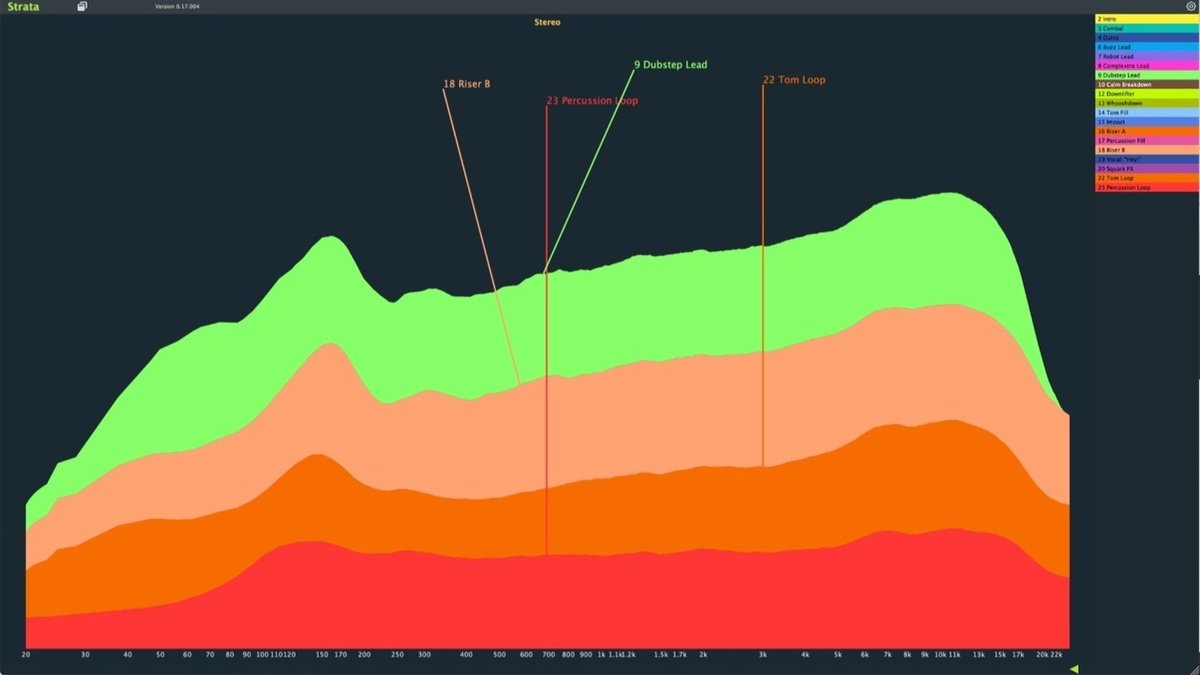
Unlike a standard spectrum analyzer that only shows the master output or a single channel, Strata layers your tracks on top of each other like geological formations. It provides an instant, birds-eye view of your entire sonic landscape, making it obvious when a synth is stepping on your high-hats or when a background vocal is eating up the space reserved for your kick and bass.
How It Works
The workflow is built for speed. Strata consists of two specialized components:
Strata Track You place this at the end of the signal chain on every track you want to monitor. It’s lightweight and designed to pass audio through untouched.
Strata Vision This is your dashboard. You can place it anywhere, usually on your primary or secondary monitor. Using a clever internal protocol, all the “Track” instances feed their data into this one graph.
Why Producers Love It
Visual Mixing Identify frequency collisions without relying solely on tired ears.
Clarity in Seconds Spot “mud” in the low end or harshness in the highs by seeing exactly which tracks are intruding where they shouldn’t be.
Customizable Palettes Match the graph colors to your DAW’s track colors automatically, or choose from several high-contrast palettes to make the data pop.
Performance First Includes a global “Low CPU” mode that pauses processing across all instances with one click, so you can save resources during heavy tracking sessions.
Claim Your Discount Before Time Runs Out
Visualizing your mix shouldn’t be a luxury reserved for high-end studios. For a limited time, we are offering Strata at a significant discount to help you clear the fog in your productions. Whether you’re working on a dense orchestral score or a heavy electronic track, this tool changes the way you approach balance. Add Strata to your cart today and see what your ears have been missing before this deal disappears.
Your Music As You’ve Never Seen It Before
See the frequency spectrum of every track in your project in one graph! It’s like an X-Ray of your song. Instantly see which tracks are muddying your low end, and which synths are reaching up into your high hat zone. Look at the mids and it will be obvious if one track is too loud. See tracks arrive and leave the graph. Watch this one-minute demonstration.
Drop And Look
Drop the Strata Track plugin on each track and then drop the Strata Vision plugin on any track and open it. It’s that simple! Watch the first two minutes of this video in which Strata is deployed in a Bitwig project (from scratch) just in time for the drop (at 1:30)!
Cleanup Your Song — Before
Here is a screenshot of Strata showing the first cut of a song. As you can see, by using Strata, it is immediately obvious:
- The bass is reaching down too low and intruding on the kick and the sub.
- The lead is also extending down far too low.
- The pad is completely out of control in the whole spectrum.
- The pad is far too loud relative to the other tracks.
Cleanup Your Song — After
Here is a screenshot of the song after it has been cleaned up with simple high and low EQ cuts on each track:
- The bass has been restricted from the low end and thinned a little at the top.
- The lead has been trimmed at the top and the bottom so that it sits in the middle of the spectrum.
- The pad has been trimmed too and its volume lowered.
- The sub has also been moved down an octave.
Note This is just an example; it’s not always best to routinely low+high cut like this.
Choose Your World Of Colour
Choose from a range of graph colour palettes or automatically import your DAW’s track colours (Ableton Live, Bitwig Studio, Cubase, FL Studio, Reaper only). Here are the colour palettes Summer, Autumn, Winter, Spring, and Rainbow. You can click on them to have a closer look.
Stretch Your Canvas
Resize Strata’s window to whatever you like: big, small, tall, or wide. Strata adjusts its spacing, line widths, and font sizes to suit whatever window size and shape you choose.
Tread Lightly
- Low RAM.
- Low CPU.
- Crashproofing is Strata’s primary design goal.
- If you’re going to put Strata on every one of your tracks, it had better be rock solid. And it is!
Be Free
Run Strata hassle-free. Strata’s copy protection is designed merely to remind you to pay, not to engage in a pointless escalating tech war with bootleggers:
- No iLok.
- No dongle.
- No subscription.
- No computer ID lock. Strata just works if you upgrade to a new computer.
- No requirement of internet access.
- Never blocks audio, even if there is no licence certificate.
- Install (for your own use) on multiple computers, or
- Install on one computer for multiple users.
- Every version of Strata will run forever, (at least until the plugin’s host environment (e.g. OS and DAW) renders the executable un-run-able).
- Strata comes with five years of free updates.
See Your DAW
Installation Instructions
2. Click Add Strata Standard To Cart
3. Click voucher?
4. Enter the Discount Code found in your Plugin Boutique Library under Serial Number > Click Add Voucher To Shopping Cart
5. Confirm the total is $0 > click Checkout…
6. Fill in your details > click Next
7. Open your email inbox > click the link to confirm your email address
8. Click Place Order
9. Click Next until you reach the Download page > click the Download icon for your Operating System > install the plugin
10. Open the Strata Vision plugin in your DAW > Enter the Username and Password from your email inbox > click Install Licence
11. A confirmation message will appear
Your plugin is now authorised and ready to use, enjoy!
FEATURES
Visualize every track frequency simultaneously in one unified window Layered spectral views identify hidden instrument collisions instantly Map plugin colors to match your DAW track colors Lightweight track plugins pass audio without coloring your sound Global low CPU mode pauses processing during heavy sessions Switch between high contrast palettes for better visual clarity High frame rate graphics ensure smooth real time monitoring Resizable interface fits any screen or multi monitor setup Proprietary internal protocol syncs data without complex routing Pinpoint specific tracks to focus on problematic frequency areas Streamlined workflow designed by producers for professional mix balance Real time analysis reveals exactly where your mix lacks space
- Note: Please be aware you will be required to visit an external website in order to create an account, redeem and download your product. We do not host the download at VSTAlarm.