🔥 RESET YOUR EPSON PRINTER QUICKLY & EASILY!
Is your Epson printer showing “Service Required,” “Ink Pad is at the End of Its Service Life,” or a Waste Ink Pad Counter warning?
Click the Buy Now buttons to purchase a reset key
Download Resetter
Get a Resetter RESET KEY and restore your printer’s waste ink counter using our supported Resetter utility.
✅ Fast Digital Reset Key
✅ Easy-to-Follow Reset Process
✅ Secure Online Key Verification
✅ Supports Many Epson Printer Models
✅ No Need to Replace Your Printer
✅ Designed for Waste Ink Pad Counter Reset
🔑 What You Get
🔥 RESET YOUR EPSON PRINTER WITH A RESETTER RESET KEY! 🔥
Is your Epson printer showing “Service Required”, “Ink Pad is at the End of Its Service Life”, or a Waste Ink Pad Counter error?
Click the Buy Now buttons to purchase a reset key
✅ Get a Resetter Reset Key and restore the waste ink counter through our supported Resetter service.
🔑 Why choose our Resetter Reset Key?
✔️ Fast and convenient activation
✔️ Designed for supported Epson printer models
✔️ Helps reset the Waste Ink Pad Counter back to 0% when the printer and model are supported
✔️ Simple guided process
✔️ Remote assistance available when needed
✔️ No need to bring your printer to a service center just for a counter reset
✔️ Ideal for printer owners, technicians, computer shops, and printing businesses
Show allShow less
Download Resetter
🖨️ HOW IT WORKS
1. Purchase your Reset Key
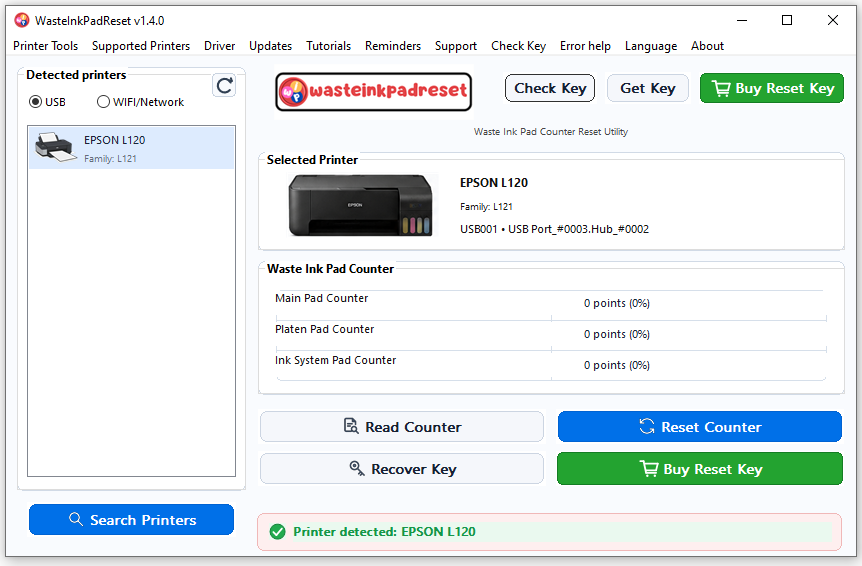
2. Download/Open the Resetter application
3. Connect your Epson printer by USB
4. Enter your Reset Key
5. Follow the reset procedure
6. Restart the printer and continue printing
https://resetter.net/wp-content/uploads/2022/07/RESETTER-TUTORIAL-1.mp4
Watch the tutorial video
💻 Windows Compatibility
✅ Windows 10 — 64-bit
✅ Windows 11 — 64-bit
For best results, connect the printer directly to the computer using a USB cable during the reset process.
🔐 Each Reset Key is an authorization token for the reset service, helping ensure controlled and secure use of the Resetter system.
⚠️ Important: Resetting the counter does not physically replace or clean the waste ink pads. If the pads are already saturated, proper inspection, cleaning, or replacement is recommended to prevent ink leakage.
📩 Need a Reset Key? Message us today!
🖨️ RESETTER — Resetting Made Easy
🔑 Get your Reset Key. Reset the counter. Get back to printing.