Check out the key readouts
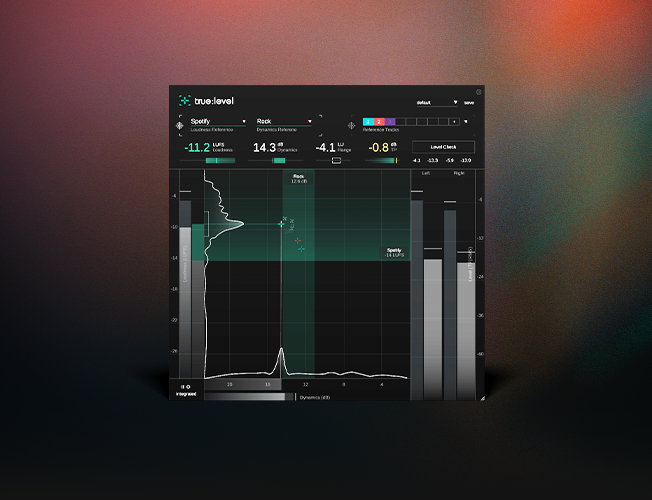
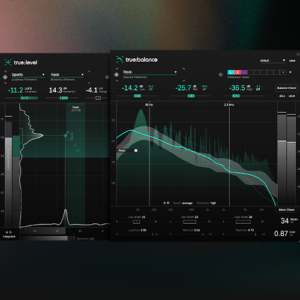
Monitor all relevant key readouts at a glance:
• Loudness [LUFS] – integrated, short-term, momentary
• Loudness Range [LU] – integrated, short-term, momentary
• Dynamics [dB] – based on Peak to Loudness Ratio
• True Peak [dBTP] – using high-resolution oversampling
Mixbus TV
English
Watch review
White Sea Studio
Eric Kaufmann
spl Mixing
Claudio Meloni
Italian
Read review
Produce Like A Pro
Gearspace
Home Studio Simplified
Junya Watanbe
Japanese
Weiss Advice
Audio Toolshed
Warp Academy
Pro Audio
German
The full package – including true:level
Bundles
DEAL
€99.00 Original price was: €99.00. €69.00 Current price is: €69.00.
Metering Bundle
Loudness, dynamics and spectral balance metering for confident mix decisions. Check your sound against targets and references before release. Save 28% by buying the bundle.
Try
Add
€599.00
Studio Bundle
Complete sonible audio plug-in collection for mixing, mastering and metering. Get intelligent processing and specialist tools for your whole workflow. Save 54% by buying the bundle.
FAQ
Before you ask
What does the loudness reference zone displayed for streaming platforms (like Spotify) tell me?
The loudness reference zone of streaming platforms shows that all LUFS values above a certain minimum value are “ok”. This minimum value represents the reference loudness used for loudness normalization by the respective platform. For some in-depth information on loudness normalization for streaming platforms, check out this blog post.
Loudness & Streaming Platforms
Almost all streaming platforms normalize every track to some reference loudness (e.g. -14 LUFS for Spotify). So while it would be a bad idea to sacrifice dynamics to make a track really, really loud that will be turned down later on anyway, making a track louder than the reference is no problem at all.
Yes, it will be turned down – but so is every other track. Every track is normalized to the same perceived loudness level, meaning that no track is louder than another after normalization.
It’s only important not to fall BELOW the reference loudness of a platform. If a track is too quiet it will be turned up – and that can lead to unwanted limiting. That’s why true:level and smart:limit qualify all loudness values above the reference loudness of a streaming platform as good.
Hint: If you want to, you can turn down the track to a certain reference loudness using the linear output gain of smart:limit. But please note that the end result on the platform will not change, since the platforms will also simply linearly turn down the gain. 😉
Loudness Standards
Loudness Standards suggest an actual target loudness (not only a minimum reference loudness). As a consequence, all loudness values above or below the loudness target of a loudness standard are potentially a problem and true:level and smart:limit will show a respective hint.
How is the dynamics value displayed by true:level computed?
true:level is using the median of all measured PSR values (peak to short term loudness ratio) to compute the dynamics. Please check out the following article for more details.
See all FAQs
“sonible’s metering plug-ins are going to play an integral role in any production I do – in mixing and definitely in the mastering stage.”
– Robert McClellan
Music producer & musician
“A really useful tool for assessing the dynamic range and loudness of our tracks – or more importantly our masters.”
– Ed Thorne
Sound engineer, musician & reviewer | Ed Thorne Mixing & Mastering
“It’s a lovely tool to get in your track and figure some things out so you can improve your mixing.”
– Warren Huart
Recording & mixing engineer
Related Blogposts
Dive deeper
The Metering Bundle is part of Fourier Audio’s transform.suite ’25!
Fourier Audio’s transform.suite ’25 contains over 70 premium plug-ins optimized for use in live productions – true:level and true:balance are part of it.
Read more
Analog Isn’t Always Better – the Big Benefits of Digital
The analog sound may be loved by many music producers, but here are the ways that digital technologies can outshine their ancestors.
Dynamics: What’s Changed?
From tape recordings to the loudness wars and digital streaming, how have the dynamics of music changed over the years, and why?
Taking Your First Steps into Mastering
Many are aware of the process of mastering a track; This article aims to unwrap the enigma that is mastering music, from what it is to what it does, and how to do it.
true:level User Guide
Visit the true:level User Guide to see all tutorials featuring the loudness and dynamics metering plug-in.
true:level and reference tracks
Learn how to use the versatile metering plug-in true:level with reference tracks.
Features, specs & changelog
The core of your sound
Download Manual (PDF)
Key Features
Specs
Changelog
- Integrated LUFS measurement
- Short-term and momentary LUFS
- Loudness Range measurement
- Peak-to-Loudness dynamics measurement
- True Peak metering
- Publishing-platform loudness references
- Genre-based dynamics references
- Up to 8 custom reference tracks
- Loudness/dynamics reference zone visualization
- Level Check with corrective guidance
Plug-in Specifications
plug-in formats (Mac) VST, VST3, AU, AAX plug-in formats (Windows) VST, VST3, AAX supported sample rates 44.1 kHz to 192 kHz authorization machine-based or iLok (see FAQ) Apple Silicon support native Latest version 1.0.4
System Requirements
PC Windows 10+ (64 bit) Mac MacOS 10.12+ RAM 4GB CPU Intel Core (i5), Apple Silicon GPU OpenGL Version 3.2+ DAW List of tested DAWs
1.0.4
2024-04-07
- fixed CPU load spiking with digital zero inputs on certain systems
1.0.3
2024-01-08
- fixed stability issue in Cubase 13
1.0.2
2023-02-01
- added AAX Apple Silicon support
- added support for directories in preset list
- added headings to Loudness Reference dropdown by type
- minor improvements
1.0.1
2022-12-06
- added auto-reset-on-playback option
- added feature to automatically adapt display range to current reference